- DATE:
- AUTHOR:
- The SafetyChain Team

Optimized Navigation Menu
What’s New
Navigating LINK just got faster and cleaner. We've updated the left navigation menu to load more quickly and show only what's relevant to your organization — so users spend less time waiting and less time wondering why something isn't working.
The LINK navigation menu has been enhanced to improve both performance and usability. The updated menu loads significantly faster and displays only the modules and areas a user's organization has access to. Parent items associated with unsubscribed or unauthorized functionality are now fully hidden, eliminating confusion and visual clutter. The result is a cleaner, more focused navigation experience that aligns directly with each customer's licensed capabilities.
Loading Time Improvements
The left navigation menu loading has been improved and now displays immediately. Notice the difference below between the current menu loading experience (left) and the updated menu loading experience (right).
A More Focused View
We’ve also improved the focus of the left navigation menu by hiding the tier 1 navigation option if the user is unable to access any of the navigation option’s subpages. Historically in the system when no subpage access was granted, users could still interact with the top-level tier 1 navigation option. This resulted in clicking the arrow to expand the menu and nothing would appear, the arrow would just flip up and down. The result of these improvements is a more focused user experience where we do not present navigation options that the user can’t access.
Pre-release behavior:
The video below demonstrates the challenge that is experienced when none of the Corrective Actions navigation menu options are accessible.
Post-release behavior:
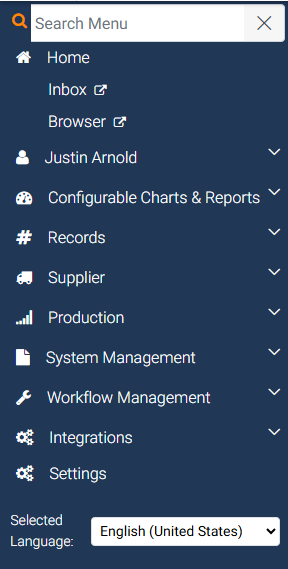
The image below demonstrates the updated behavior. The Corrective Actions navigation menu option is not displayed at all since none of the subpages are accessible.
Benefits
The navigation menu now loads immediately. No more waiting for the menu to populate before you can get to work.
Only the modules and areas your organization has access to are shown, so the menu reflects your actual workspace rather than a list of options you can't use.
Hidden parent items mean no more dead-end clicks or expanding a menu section only to find nothing inside.
A cleaner, more focused menu makes it easier for new users to orient themselves and for everyone to move through the product with less friction.
Availability
Available to all customers with no action required. You'll notice the updated navigation experience immediately in the product.