- DATE:
- AUTHOR:
- The SafetyChain Team
SafetyChain App Version 1.27 & Enhanced Operational SPC Charts
Version 1.27 brings the Enhanced Operational SPC Charts feature to iOS and Android, introducing a set of new mobile controls that honor your web chart configuration and improve chart readability on smaller screens. This release also restores landscape orientation support on Android and includes a round of targeted bug fixes.
Enhanced Operational SPC Charts
The Enhanced Operational SPC Charts feature is now available on mobile. For the full feature overview, see the main announcement: Enhanced Operational SPC Charts. The items below highlight what's specifically new for iOS and Android users.
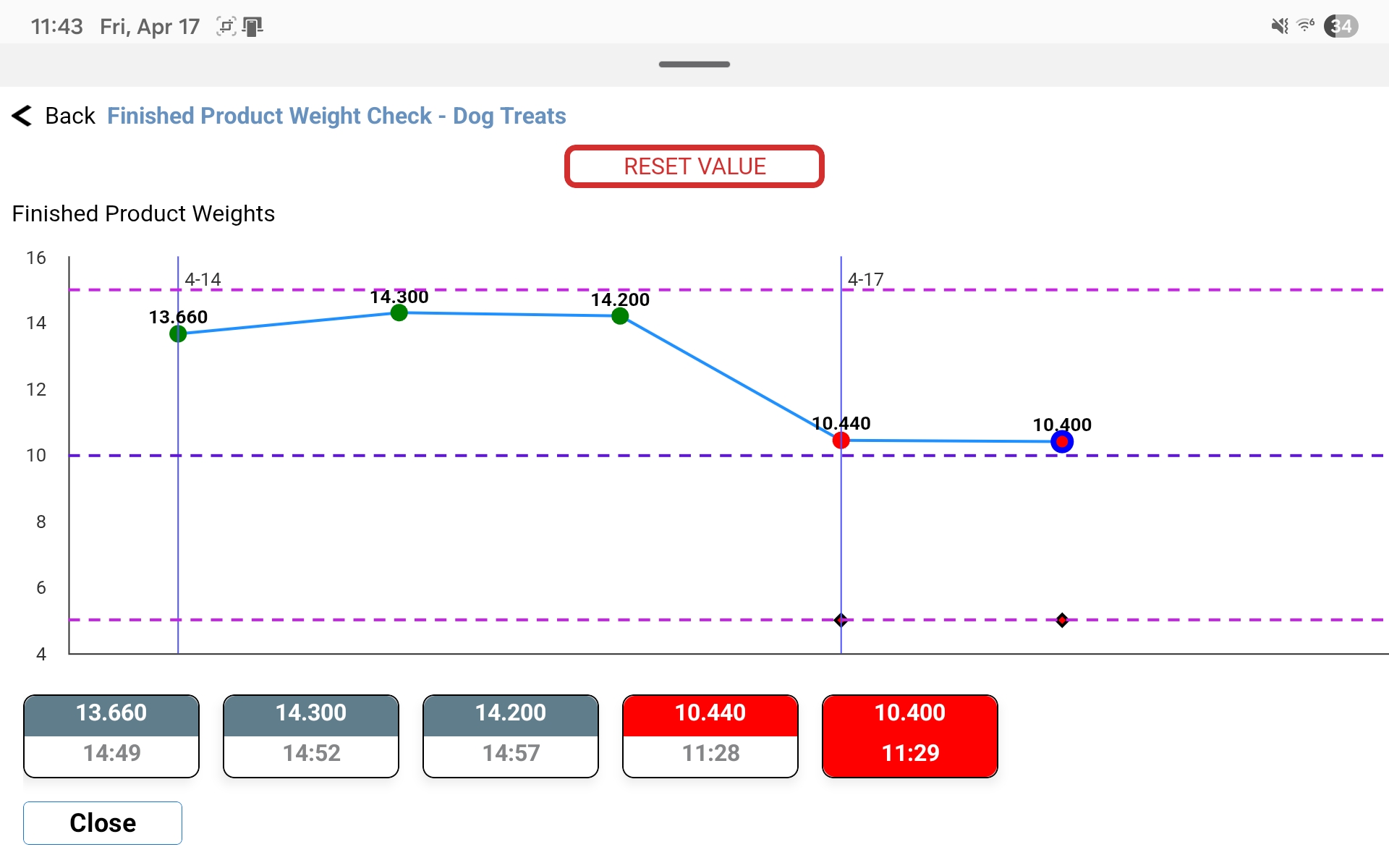
Chart settings now honored on mobile — In-app SPC charts now respect the display settings you've configured on the web, including Centerline, Control Limits, Specification Limits, Decimal Digits, Range Charts, Color Bands, and the Data Plots & Range window. Mobile chart views now stay consistent with your plant's configuration.
Cleaner, more readable charts — Charts have been streamlined for small screens: Y-axis labels and the UCL/LCL/Mean labels on plotted lines have been removed to reduce clutter, and the configured time zone is now shown on the X-axis.
Dynamic chart scaling — Charts now automatically adjust scaling to keep all plotted points, control limits, and specification limit lines fully visible, regardless of data range.
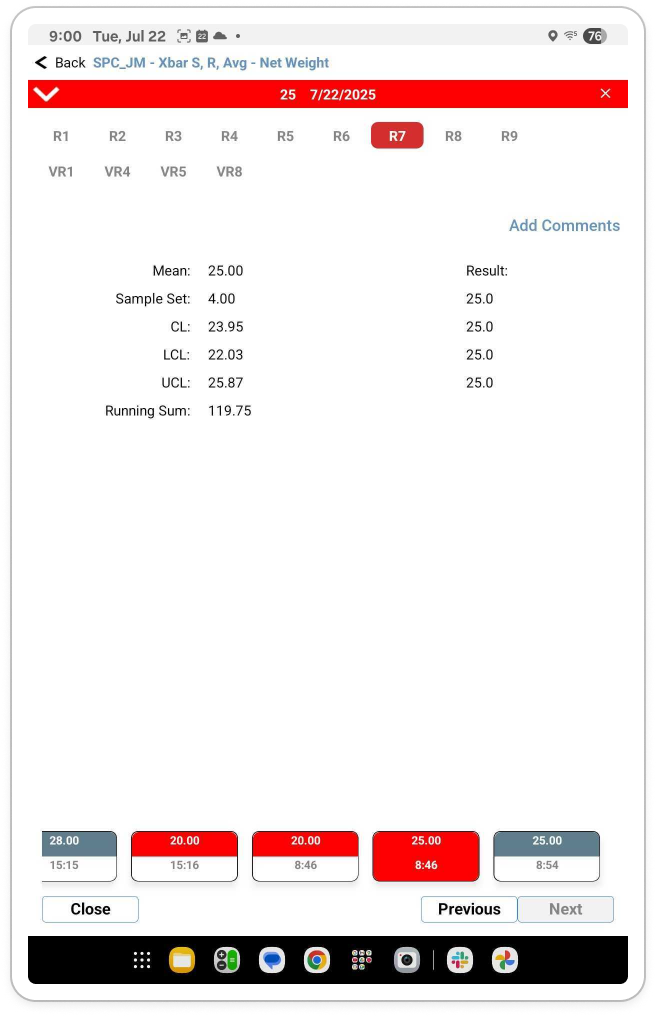
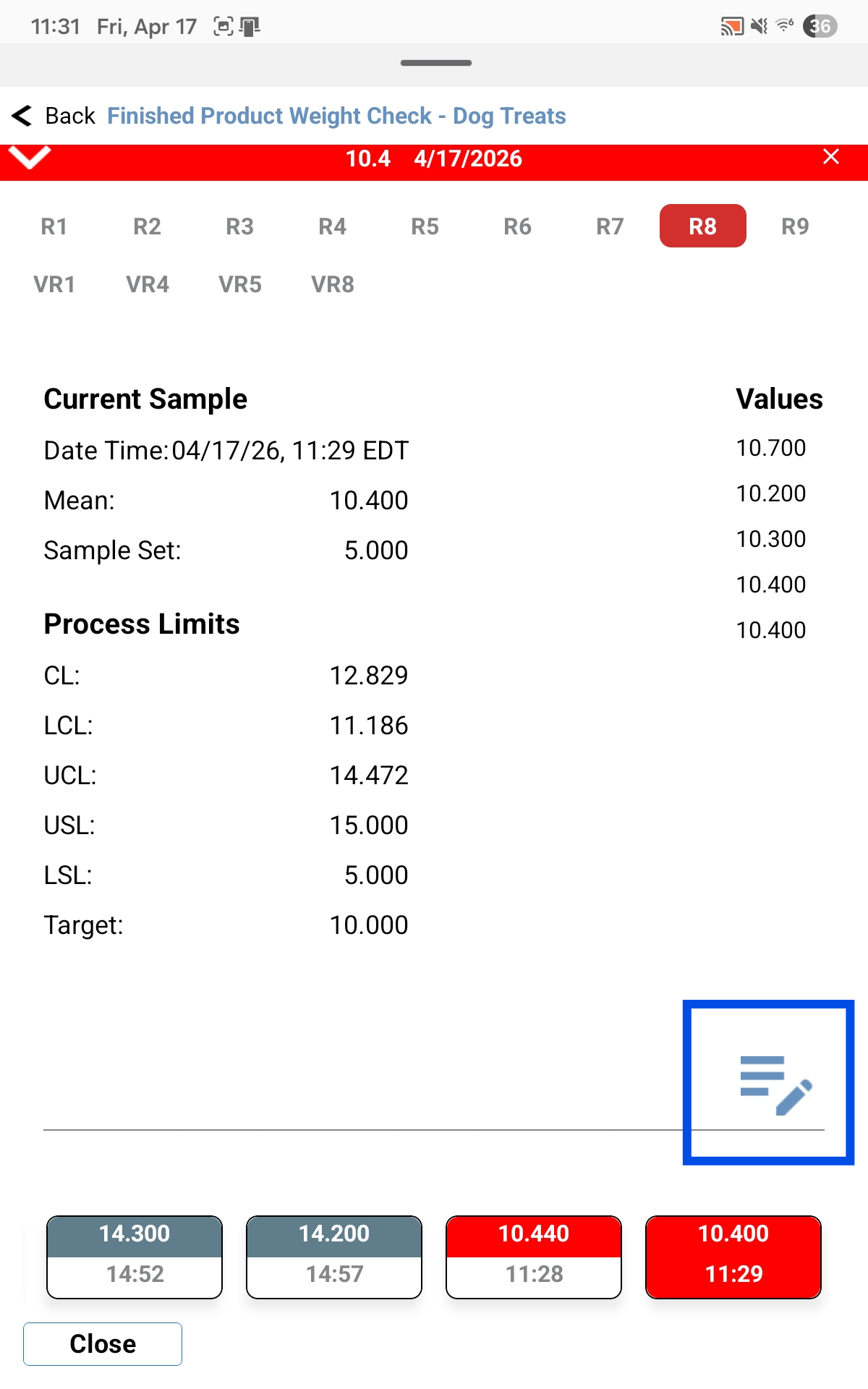
Details panel refresh — Updated the layout of the chart Details panel for improved readability.
Helpful spec limit messaging — If configured specification limits can't be displayed due to inconsistencies in form compliance values, a message now appears on the chart to explain why.
Chart Example with specification limits enabled and control limits hidden:
In the expandable Details panel, we’ve cleaned up the formatting and labels for improved readability. The “Add Comments” button has been moved to the lower right corner for easier access with gloved hands holding a tablet.
Previous
1.27 Release
Note: Our PC app is undergoing some required under-the-hood updates. We plan to bring it into parity with these new features at a later date. Keep an eye out for future updates.
Landscape for Android
Android tablet users can once again rotate their device to view the mobile app in landscape orientation, restoring parity with iOS. To avoid layout issues on small screens, portrait orientation remains locked on phones.
Note: Some newer versions of Android override an app's portrait lock, so your device may have already been rotating to landscape orientation prior to this update. With this release, it's officially supported on tablets — meaning we'll continue designing and improving the landscape experience.
Bug Fixes
Faster login and initial sync — Improved login and initial sync performance for users assigned to large numbers of locations or resources, reducing time spent on "Fetching data" and "Please wait" screens.
Attachment file names preserved — Documents and images attached from device storage now retain their original file names on submission and sync, rather than being replaced with a generated ID.
Accurate aggregate values after web sync — Resolved an issue where aggregate numeric fields could gain an incorrect leading zero after a form was saved on the web and synced back to mobile.
Reclaimed device storage from attachments — Temporary files from HEIC-to-JPG conversion, and cached document attachments on Android, are now properly cleaned up to prevent unnecessary storage buildup over time.
SSO return-to-login button visibility — Fixed a UI issue where the return-to-login button on the SSO screen was obscured by the device header on some screen sizes.
BMP uploads blocked — BMP files can no longer be attached to forms from the mobile app, aligning with web platform support. If a BMP is selected, a message clearly states that the file type is not allowed.
Improved device diagnostics — Added device model, RAM, OS version, and other device-specific information to logs to help troubleshoot customer issues more quickly.
OTA Updates
Over-the-Air updates released for this version will be noted here. Please add this page to your bookmarks, or check back periodically for updates.